Managing tracking consent with other applications
The __clt field is not automatically applied to every delivery method available in Contactlab. Its behavior depends on the system used.
SmartRelay
SmartRelay does not use the __clt field. The customer is therefore responsible for managing tracking preferences.
To enable or disable open and click tracking for an individual email, use the headers described in the SmartRelay special headers documentation.
Bulk sendings via SOAP API and XMLDelivery
Automatic tracking management through __clt is available for bulk sendings performed via SOAP API and for sendings managed through XMLDelivery, provided that the field is present in the user database.
In these cases, Contactlab uses the value associated with the recipient:
- with
__clt = 0, the communication is sent without open and click tracking; - with
__clt = 1, the communication is sent with open and click tracking enabled.
If tracking consent is not managed through __clt and tracking must be disabled, the configuration of the relevant email group must be modified:
- access the configuration of the email group being used;
- locate the default tracking preferences;
- disable open and click tracking;
- save the configuration.
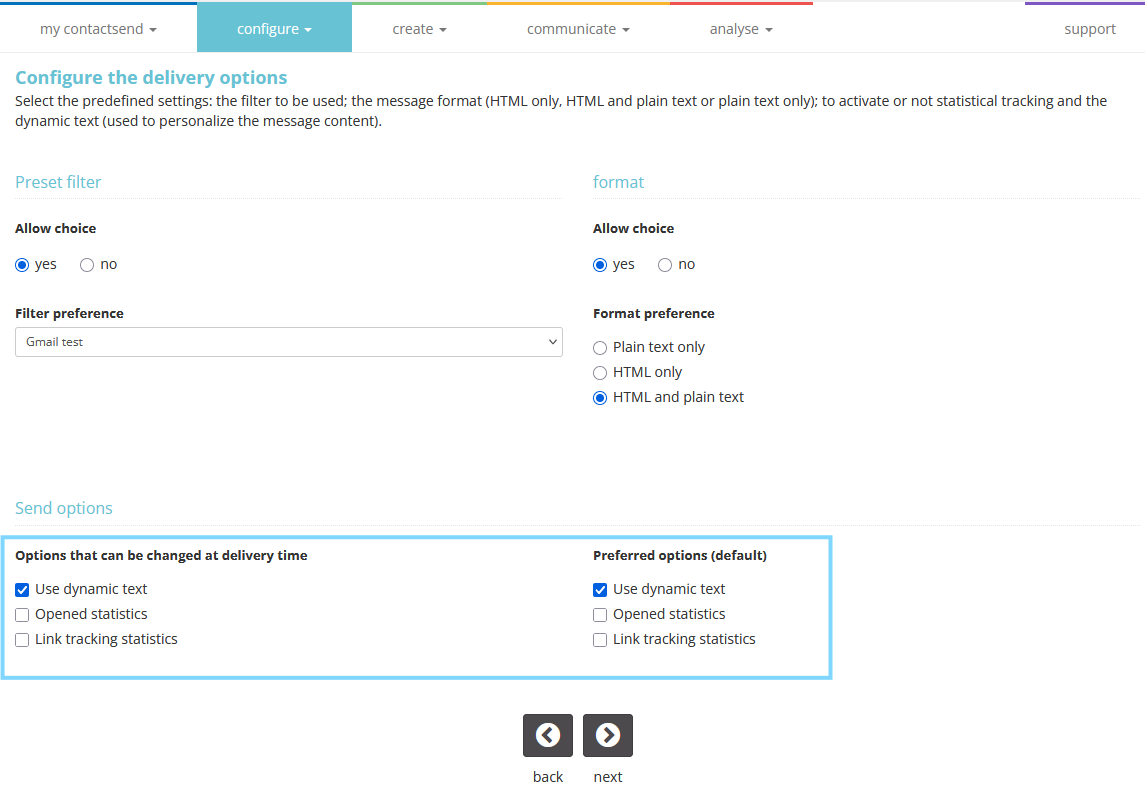
The email group configuration applies to the entire sending and does not distinguish recipients based on the value of __clt.
For sendings managed through XMLDelivery, link tracking must also be disabled in the XML file, as described in the documentation, by setting the <links> element to off, as shown in the following example:
<body>
  <text>
    ...
    <preferences>
      <stats>
        <links>off</links>
      </stats>
    </preferences>
  </text>
</body>
Links included in the .xml file must not have the track property set to yes.
SendImmediate
The __clt field is not considered for SendImmediate sendings. These sendings can be performed:
- via SOAP API;
- through the CDP Automations > Marketing Automation module.
For SendImmediate sendings via SOAP API, tracking can be disabled by modifying the configuration of the relevant email group, as described above.
For emails sent through the CDP Automations > Marketing Automation module, tracking can be disabled:
- by modifying the configuration of the relevant email group;
- for an individual sending, in the Send Email step. For more information, see Managing tracking consent with CDP.